
Switching from a shared mailbox: when flags and folders stop keeping up
A shared mailbox in Outlook or Microsoft 365 is where most IT and support teams start: everyone can see support@, flags mark what's open, folders hold what's done.
A help desk is better than a shared inbox because each message becomes a ticket with one owner, a status everyone shares and a history that includes private notes, so requests aren't answered twice or lost. An Outlook or Microsoft 365 shared mailbox shows everyone the same messages, but the shared mailbox doesn't count how many requests came in or how fast they were handled. Cayzu takes the mail from the support address you already use and routes each request with rules, and on Pro and up, Cayzu also reports on volume and speed.
Related features
Does a Microsoft 365 shared mailbox need a license, and what does a help desk cost on top?
A Microsoft 365 shared mailbox needs no license of its own up to 50 GB, and Cayzu adds $19 per agent a month, billed yearly, on top.
Microsoft's page "About shared mailboxes in Microsoft 365", checked October 28, 2026, says each person using a shared mailbox still needs their own licensed Exchange Online mailbox. Billed monthly, Cayzu is $24 per agent a month.
What is a shared mailbox, and is it meant for a support address?
A shared mailbox is one Microsoft 365 mailbox that several people use, and Microsoft names support email addresses as one of its uses.
Microsoft's page says shared mailboxes are useful for support addresses, and they are, up to a point. Users with permission can send from a shared mailbox as the team's address. People outside your business, such as someone with a Gmail account, can't be given access.
How many people can use a shared mailbox, and how big can it get?
A Microsoft 365 shared mailbox supports up to 25 users and holds 50 GB without a license, or 100 GB with an Exchange Online Plan 2 license.
Microsoft says too many people in it at once can cause connection failures or duplicated messages, and suggests a Microsoft 365 group for more users. When a shared mailbox is full, it receives mail for a while but can't send, then bounces new mail back to senders.
See it with your own tickets.
Every feature for 15 days. No credit card. No contract.
Can you turn Outlook into a ticketing system with rules, categories and folders?
You can get part of the way with Outlook, but Microsoft's shared mailbox page describes no way to assign a message, give it a status or report on it.
Teams try a category per person, a folder per stage and rules that sort mail as it arrives. Each of those is a habit the team keeps by hand, and a flag shows a message is open, not who has it. It holds until someone's away, someone forgets, or someone deletes the wrong thing, and Microsoft says you can't prevent users from deleting messages in a shared mailbox.
Does Microsoft have its own ticketing system?
Microsoft sells Dynamics 365 Customer Service, a separate product that can turn incoming email into cases, but Microsoft's shared mailbox page describes no tickets.
Microsoft's Dynamics 365 page, checked October 28, 2026, describes rules that create a case from an email sent to a queue's address, and offers a free trial. It lists no price. If your company already runs Dynamics 365, that's worth asking about first. Microsoft Lists also has an "Issue tracker" template with Status and Assigned to columns and two rules that email the assigned person, though Microsoft's page doesn't say email can feed it.
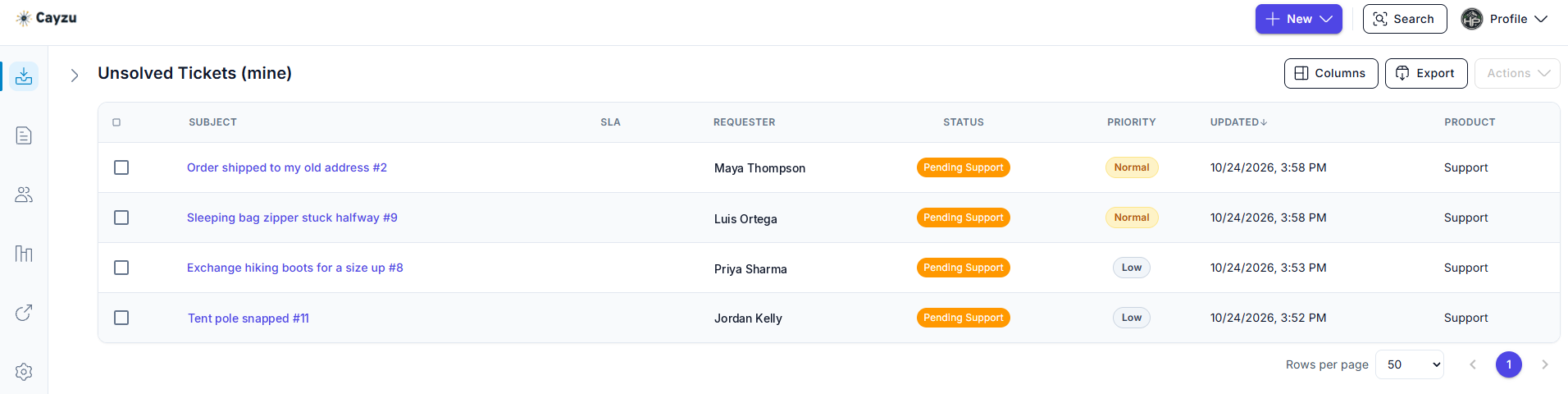
What's the difference between a shared mailbox and a help desk?
A shared mailbox shows everyone the same messages, and a help desk like Cayzu turns each message into a ticket with a number, an owner, a status and a history.
| Microsoft 365 shared mailbox | Cayzu | |
|---|---|---|
| Who owns a request | Nobody. A flag shows a message is open, not who has it | One agent per ticket, set by hand or by assignment rules |
| Status | Flags and folders | New, open, waiting or solved on every ticket |
| History | The email thread. No request history described on Microsoft's page | The whole thread, plus private notes between colleagues |
| Double replies | Nothing described on Microsoft's page shows a colleague is replying | Collision detection on every plan warns you that a colleague is on the ticket |
| Reports on volume and speed | None described on Microsoft's page | The Help Desk Load Analysis report on every plan. The other reports and dashboards on Pro and Enterprise |
| Help center for customers or staff | None | Branded portal and knowledge base on every plan |
| How many people can use it | Up to 25 users. Microsoft suggests a Microsoft 365 group for more | Priced per agent. Teams wanting a custom agreement talk to sales |
| Price | No separate license for the mailbox up to 50 GB. Each person using it needs their own Microsoft 365 license with email | From $19 per agent a month billed yearly, or $24 monthly. 15-day free trial, no credit card |
Shared mailbox limits checked on Microsoft's page, About shared mailboxes in Microsoft 365, on October 28, 2026. Microsoft's Dynamics 365 and Lists pages checked the same day. Cayzu prices in US dollars.
In Cayzu, rules do the sorting a person was doing by hand: by subject, sender or mailbox, to a group or an agent, with a priority. A portal where staff or customers track requests and a knowledge base come on every plan. On Pro and up, the SLA clock only runs in business hours, and the quarterly numbers are in reports.
What are the disadvantages of running support from a shared mailbox?
The main disadvantages of running support from a shared mailbox are double replies, requests nobody owns, a history that's hard to piece together, and no numbers.
Two people reply to the same request because neither could see the other was on it. A request is flagged by one person and un-flagged by another and nobody owns it. A request's history is spread across whoever happened to answer it. The quarterly review asks for numbers and there aren't any. The mailbox didn't break. The team outgrew it. We've listed seven ways a help desk beats email.
Can staff and customers keep emailing the same address if you move to Cayzu?
When you switch from your shared mailbox to Cayzu, you keep your support address. Once you forward that address to Cayzu, every new email becomes a Cayzu ticket, and replies go out from your address. Your old emails stay in your shared mailbox, where you can still look things up. Help articles are written in Cayzu's knowledge base rather than imported. Running your shared mailbox and Cayzu side by side during the 15-day trial costs nothing on Cayzu's side, because the Cayzu trial needs no credit card.
- Add a forwarding rule on the shared mailbox so support@ sends a copy of each message to Cayzu. If that mailbox is in Gmail, switching from Gmail covers the details.
- Invite your agents and put them in groups that match how you split the work.
- Write assignment rules for the requests you know are coming, and switch on the auto-reply.
Plans start at $19 per agent a month, billed yearly, and if Cayzu sounds like a fit, the first 15 days are free with every feature.
Questions about shared mailboxes and help desks
We haven't checked the Outlook add-ons, so we won't rate them. A help desk like Cayzu adds a portal and knowledge base for customers on every plan, rules that route each request, the Help Desk Load Analysis report on every plan, and the other reports on Pro and up. Agents can still reply from Outlook by ordinary email, with nothing to install.
Give every request one owner. In Cayzu, each message becomes a ticket with an owner and a status everyone sees, and on every plan, collision detection warns you when a colleague is already on the ticket.
Yes, with Cayzu's reports and dashboards on Pro and Enterprise, which show how long requests waited and what's still open. The Help Desk Load Analysis report, on every plan, shows when tickets arrive, so you know when you need more help. Microsoft's shared mailbox page describes no reports.
In Cayzu, the ticket sits in a shared queue rather than one person's folder, so anyone in the group can see the ticket, and an agent can reassign it by hand. On Enterprise, round robin hands new tickets out in turn.
Cayzu still feels like email to customers. Customers write to the same address and get an email back, and the ticket number is carried in the email so their next reply lands on the same Cayzu ticket.
Try it with your own tickets
Every feature for 15 days. No credit card. No contract.