
Custom agent roles: everyone can help, not everyone can close the ticket
"I thought you were on that." On a help desk where anyone can reassign, close or reprioritize anything, you hear that every week. Custom roles let you decide exactly what each person can do, and save it once.
What custom agent roles fix
Custom roles fix three problems. New agents close tickets before anyone has reviewed them. Tickets change hands and priority with no one quite sure who did it. And sooner or later an auditor or a client asks the security question: who can see what, and who can delete it.
A role answers all three. Trainees can reply and add notes but can't close. Only team leads can change priority and reassign. Contractors see their group's tickets and nothing else. The rule is written once and applies every time.
Related features
- Agent groupsGroups decide who gets the work. Roles decide what they're allowed to do with it.
- Internal notesTurn off private notes for a role, so a contractor can reply to customers without adding notes.
- IP allow listRoles limit what an account can do. The allow list limits where it can sign in from. On Enterprise.
What permissions a role controls
A role's permissions cover ticket actions, visibility and the rest of the help desk. Ticket actions: reply, add a private note, reassign, close, delete, change priority, type or status. Visibility: all tickets, the agent's groups, or only tickets assigned to them. And the rest of the help desk: reports, knowledge base editing, settings, and the customer list.
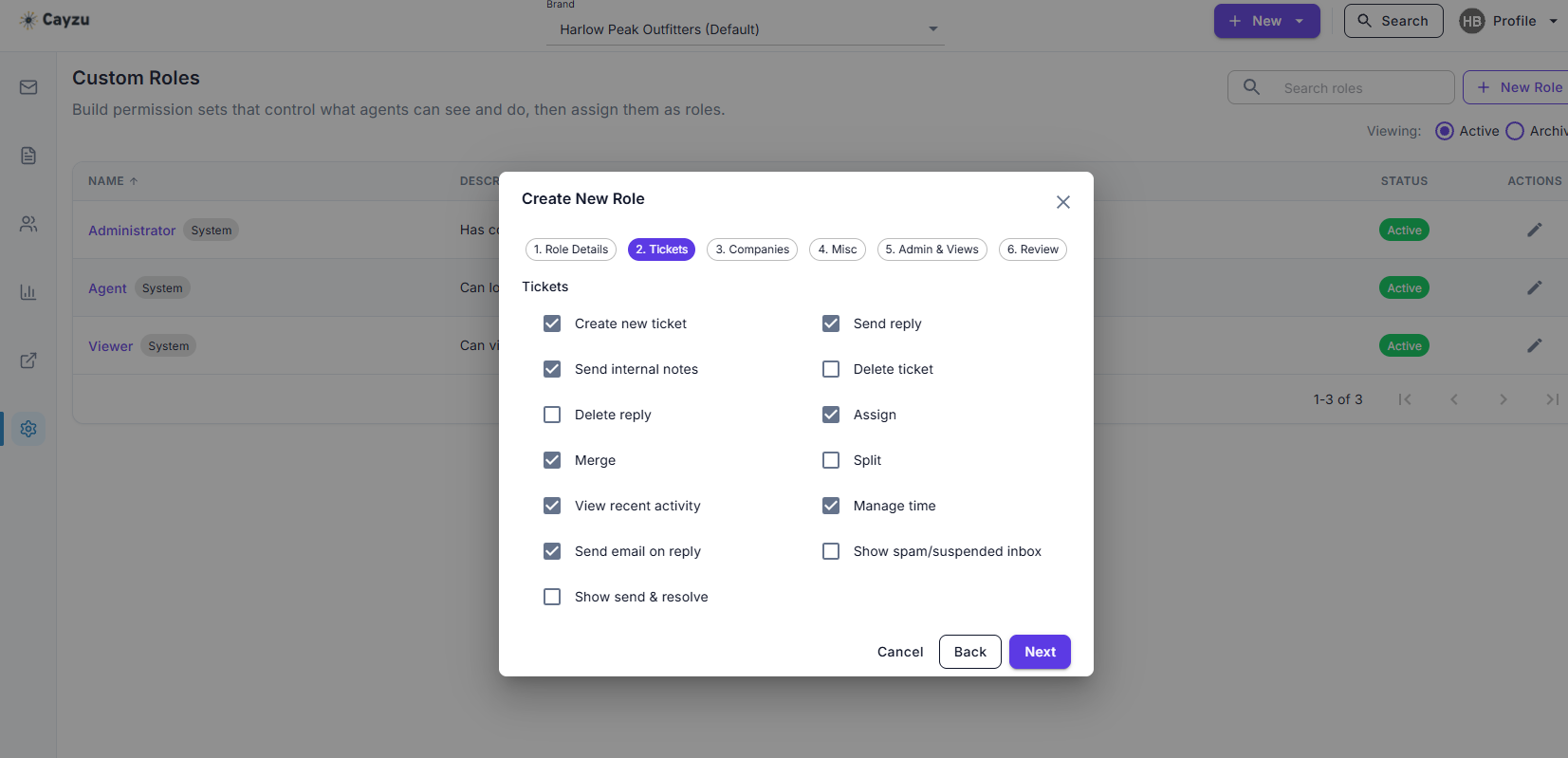
You build each role in a six-step New Role wizard: Role Details, Tickets, Companies, Misc, Admin and Views, then Review. On the Tickets step, a list of checkboxes sets what the role can do with tickets. Assign a role to an agent and it applies from then on. Change the role and everyone who holds it changes with it.
See it with your own tickets.
Every feature for 15 days. No credit card. No contract.
Setting up custom agent roles
- Start with three roles: agent, lead, admin. You may never need more than five.
- Turn off close, delete and reassign for the agent role. That's the change that stops most of the confusion.
- Give contractors and part-timers a role limited to their group, with private notes turned off if they shouldn't be writing them.
Which plan has custom roles, and their limits
Custom roles are an Enterprise feature. Every plan has the built-in agent and admin roles. See the plans.
Custom roles have two limits. A role governs the agent side only; customer access to the portal is the same for everyone. And a permission is a permission, not a workflow, so a role can stop an agent closing a ticket but can't require a review step first.
Related: groups, internal notes, the IP allow list, and HR help desks.
Questions people ask
A named set of permissions. A role might allow replying and adding notes but not closing, deleting, reassigning or changing priority. You create the role once and assign it to as many agents as you like.
What an agent can do to tickets (reply, note, reassign, close, delete, change priority and status), what they can see (all tickets, their group's, their own), and what else they can reach, such as reports, the knowledge base and settings.
Yes. Start new hires on a role that can reply and add notes but not close or reassign. When they've learned the ropes, change their role in one click. Nothing about the tickets changes.
No. Roles are for agents and managers. Customers use the portal and see only their own tickets and the public knowledge base, whichever plan you're on.
Enterprise. Standard and Pro come with the built-in agent and admin roles; the ability to define your own is the Enterprise piece.
Try it with your own tickets
Every feature for 15 days. No credit card. No contract.