
Email forwarding: forward one address and your inbox becomes a queue
The fastest way to start with a help desk is the one that changes nothing for your customers. Forward support@ to Cayzu and every email becomes a ticket, while customers keep writing to the address they've always used.
Your support email as tickets from day one
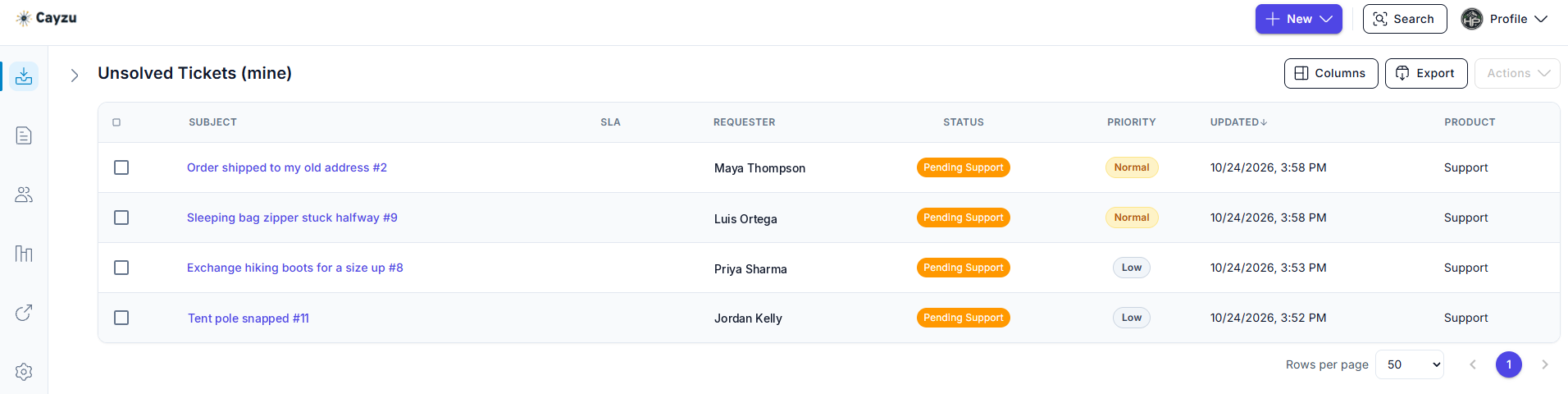
Your emails land in a queue instead of an inbox. Each one has a number, an owner, a status and a history, and none of them can be archived by accident or buried under a newsletter. Two people can work the list without stepping on each other, and a manager can see what's waiting.
Nothing changes for the people who write to you: they use the same address and get replies from the same name. The ticket number travels in the message so their next reply lands on the same ticket.
Related features
- Multiple mailboxesForward billing@ and sales@ too, and each one becomes its own mailbox in the same queue.
- Assignment rulesOnce email is arriving as tickets, a rule can hand each one to the right person on the way in.
- Email integrationAgents can answer and log tickets from their own inbox once forwarding is in place.
How email forwarding works
When you start a trial, Cayzu gives you a unique address. You add a forwarding rule in your email system so that support@ sends a copy of every message there. Each one becomes a ticket: subject as the title, body as the description, sender as the requester, attachments attached.
Replies go the other way. An agent answers in Cayzu and the customer gets a normal email from your address. If an assignment rule matches, the ticket is already assigned and tagged by the time it appears.
See it with your own tickets.
Every feature for 15 days. No credit card. No contract.
Setting up email forwarding
- Find your forwarding address in Cayzu's mailbox settings.
- Add a forwarding rule in Google Workspace or Microsoft 365 from support@ to that address. The help center guide has the exact steps.
- Send a test email to support@ and watch it arrive as a ticket. Then add any other addresses as extra mailboxes.
Which plan has email forwarding, and its limits
Forwarding is on every plan as part of the email channel. See the plans.
Forwarding has two limits. It sends a copy, so your original inbox still fills up unless you add a rule to archive what's been forwarded. And auto-replies from other systems can become tickets too, which an assignment rule can close on arrival.
Related: multiple mailboxes, email integration, and the ticket queue.
Questions people ask
Your support address forwards to a unique address Cayzu gives you. Each email that arrives becomes a ticket: the subject is the title, the body is the description, the sender is the requester, and attachments come along.
No. They keep writing to support@yourcompany.com. The forwarding happens on your side, and replies from Cayzu go out from your address, so nothing changes for them.
Their reply lands on the same ticket, because the ticket number is carried in the email. The thread stays in one place no matter how many times it goes back and forth.
Usually about ten minutes, longer if your DNS or mail server needs changes. Add a forwarding rule in Google Workspace or Microsoft 365, confirm it, and send yourself a test email. The guide in our help center has the exact clicks for each.
Every plan. The email channel is part of Standard, and forwarding is how most teams connect it.
Try it with your own tickets
Every feature for 15 days. No credit card. No contract.