
Multiple mailboxes: three addresses, one queue, nothing missed
Separate inboxes for support, billing and sales sound organized until one of them stops getting checked. Cayzu brings every address into one queue and still answers from the one the customer used.
Every support mailbox in one queue
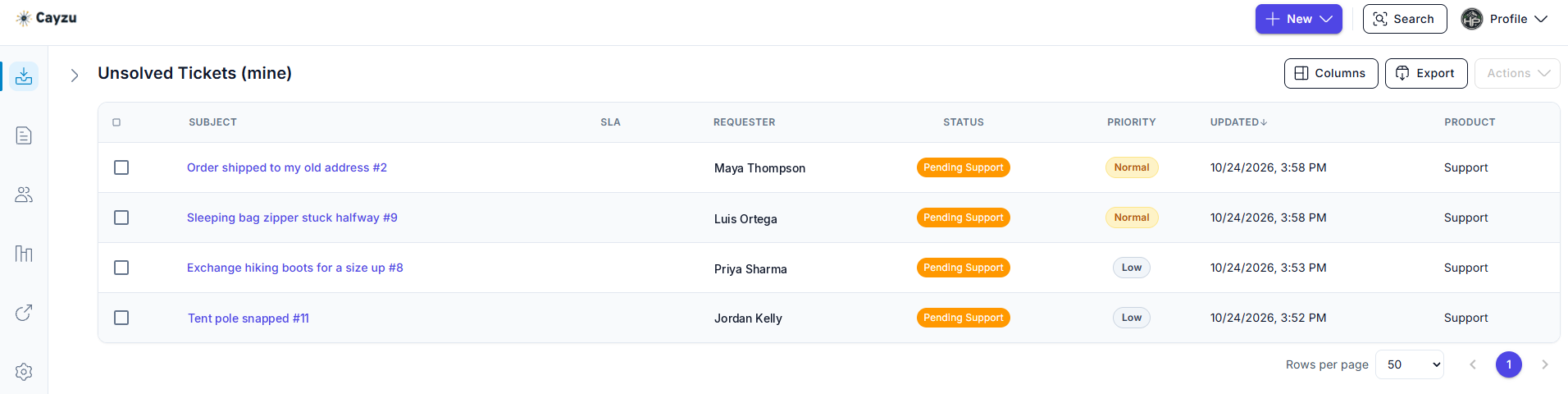
With every mailbox in one queue, your team has one place to look. Nobody has to remember to check billing@ on a Friday, because its emails are tickets in the same list as everything else, marked with where they came from. A manager sees the whole picture; an agent sees the mailboxes that are theirs.
The customer sees nothing different. They wrote to billing@ and the reply comes from billing@, with billing's signature. The internal tidy-up is invisible from outside, which is how it should be.
Related features
- Agent groupsPut your billing agents in a group, and a rule sends every billing@ ticket straight to them.
- Multiple brandsRun two companies from one help desk, and each brand gets its own mailboxes and its own portal. On Enterprise.
- Email forwardingForward each address to Cayzu, and every email that arrives there becomes a ticket.
How mailboxes work
Each address you add becomes a mailbox in Cayzu. You forward the address to it, and from then on every email that arrives is a ticket. The ticket carries the mailbox name, so you can filter the queue by it, route by it, and report on it.
Each mailbox has its own outgoing identity: the from-address, and a signature written in the built-in editor. An assignment rule on the mailbox sends its tickets to a group on arrival, and a second rule can sort finer than the address alone, by sender or subject.
See it with your own tickets.
Every feature for 15 days. No credit card. No contract.
Setting up multiple mailboxes
- List the addresses customers actually use. If one of them is someone's personal inbox, make it a shared one.
- Add each as a mailbox and forward it to Cayzu. The forwarding guide walks through the steps for Google Workspace and Microsoft 365.
- Write a signature per mailbox and add a rule sending each one to its group.
Which plan has multiple mailboxes, and two limits
Multiple mailboxes and per-mailbox signatures are on every plan. See the plans.
Multiple mailboxes have two limits. Mailboxes bring email in; Cayzu has no built-in chat or phone. And an email sent to two of your addresses at once makes two tickets, one per mailbox, which a quick merge fixes.
Related: email forwarding, groups, and multichannel support.
Questions people ask
Yes. Add as many mailboxes as you have addresses. Each one forwards into Cayzu and its emails become tickets in the same queue, labeled with the mailbox they came through.
The one the customer wrote to. A ticket from billing@ is answered from billing@, with that mailbox's signature, so the customer never sees a different address than the one they used.
Yes. Signatures are set per mailbox, with the built-in editor, so billing can sign off differently from support. The agent's own name is added on top.
Yes. An assignment rule can send everything from a mailbox to a group, and a second rule can do finer sorting on top, such as sending anything from a key customer to a named agent.
Every plan. The email channel on Standard includes multiple mailboxes and per-mailbox signatures.
Try it with your own tickets
Every feature for 15 days. No credit card. No contract.